LVLeah's DevLog
All projects
Case logStarted July 2026

Super Simple Ticketing System

The goal was to help teach 2 junior developers how to create a full-stack CRUD application in C# and SQL.

C#.NET 10SQL

Progress

Milestone tracker

3 milestones

From the build

Project log

3 entries

Milestone 1

Setting up the Azure SQL Database

I’m helping a few coworkers build their first full-stack CRUD application for their GitHub portfolios. To get the project started, I wanted to start with the database.

Here is a quick breakdown of how I tackled the initial database setup:

  • Choosing the Platform: After weighing the options, I decided to go with an Azure SQL Database for our cloud hosting.
  • Laying the Groundwork: Spun up a fresh Azure subscription and created a dedicated development resource group to keep our environments clean and organized.
  • Provisioning the Server: Deployed the Azure SQL Server resource directly into the new dev group.
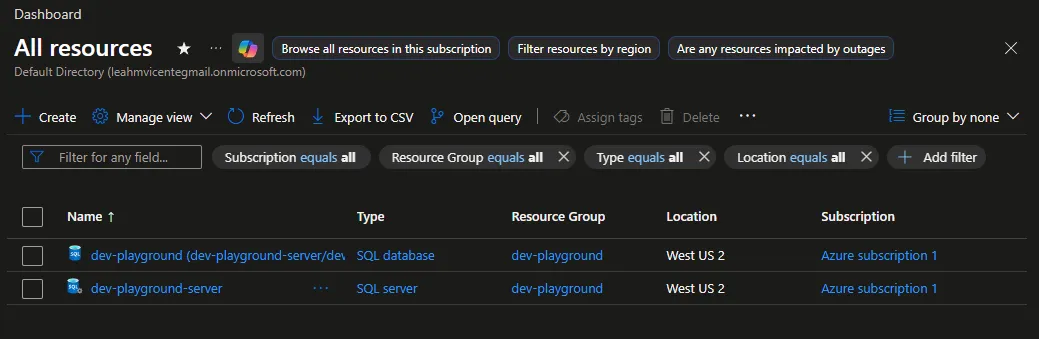
Setting up the Azure SQL Database and SQL Server

#Azure#SQL Server#SQL#database management
Milestone 2

Introducing the game plan

I met up with two colleagues that are both IT Technicians looking to level up their skills and transition into software development. We needed a project that would teach the basics of CRUD operations while resulting in something practical and usable.

We landed on building a custom Ticketing System. They already know how one functions due to their work, but building it from scratch is entirely new territory.

Since they are brand new to development, I wanted to start at the data layer to show them how information actually flows. Here is a breakdown of our first session:

  • Database Fundamentals: We hopped on a Discord screen-share to break down the core concepts of relational databases from the ground up.
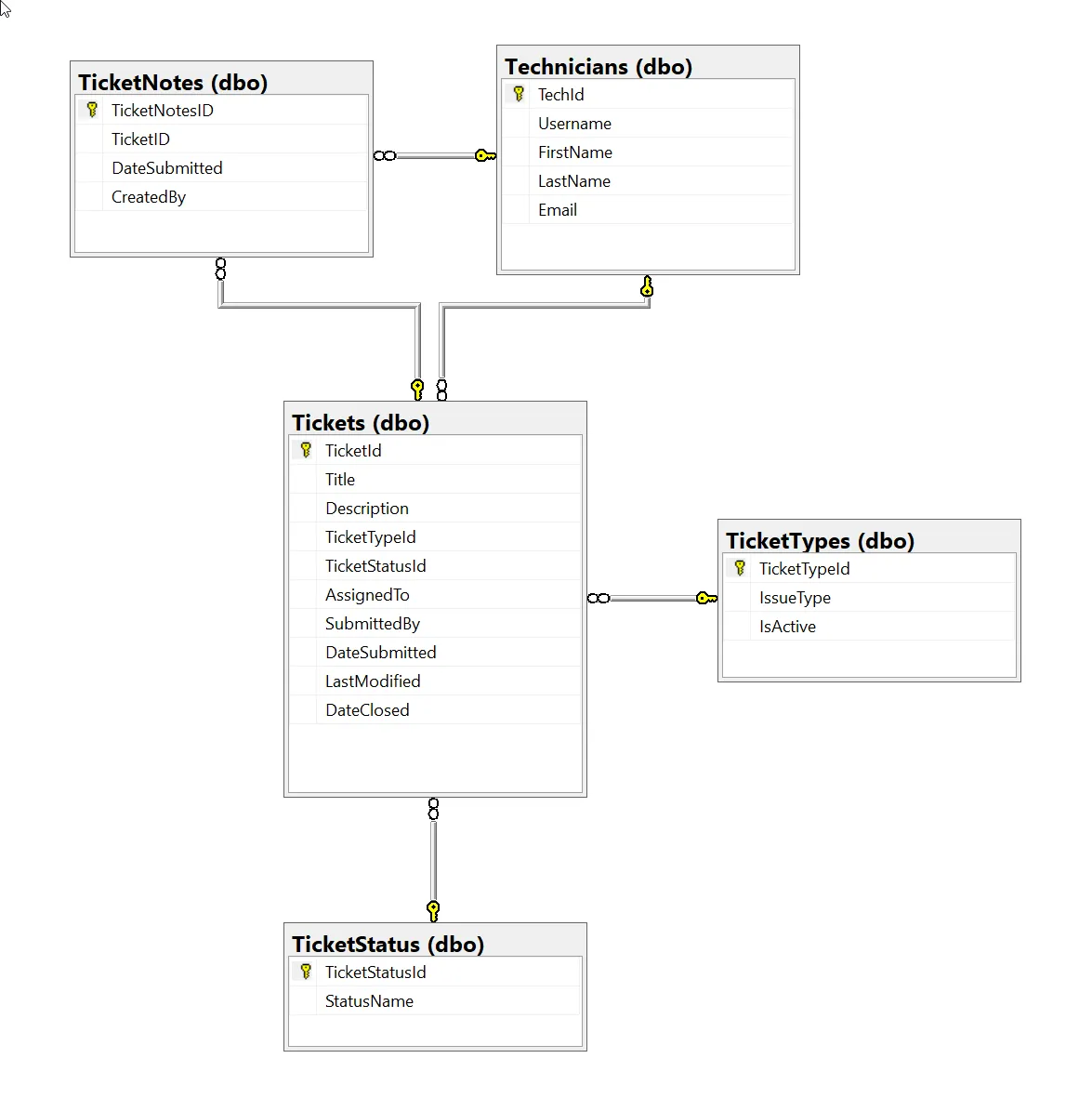
  • Whiteboarding the ERD: We mapped out how the data connects and discussed the “why” behind the architecture, specifically covering:
    • Primary & Foreign Keys: How tables (like tickets and technicians) relate and are constrained to one another.
    • Data Integrity: The reasoning behind specific data types (like strings) and when to use NULL vs. NOT NULL.
    • Normalization: The philosophy behind relational design, such as why we spin off a dedicated TicketStatuses lookup table even if it only holds two columns.
  • Writing the SQL: Once the theory made sense, we worked together to write the actual SQL statements to build out the database schema.

Current process, whiteboarded

#NET 10#planning#SQL#ERD
Milestone 3

Scaffolding the Project

The goal for today was to scaffold them a demo project which we will use later. I created the project repository for them on Github and pushed the demo on there.

Current process, whiteboarded

What I set up

  • Created the GitHub repo: super-simple-ticketing-system
  • Scaffolded a Blazor Web App on .NET 10, Server interactivity, per page/component
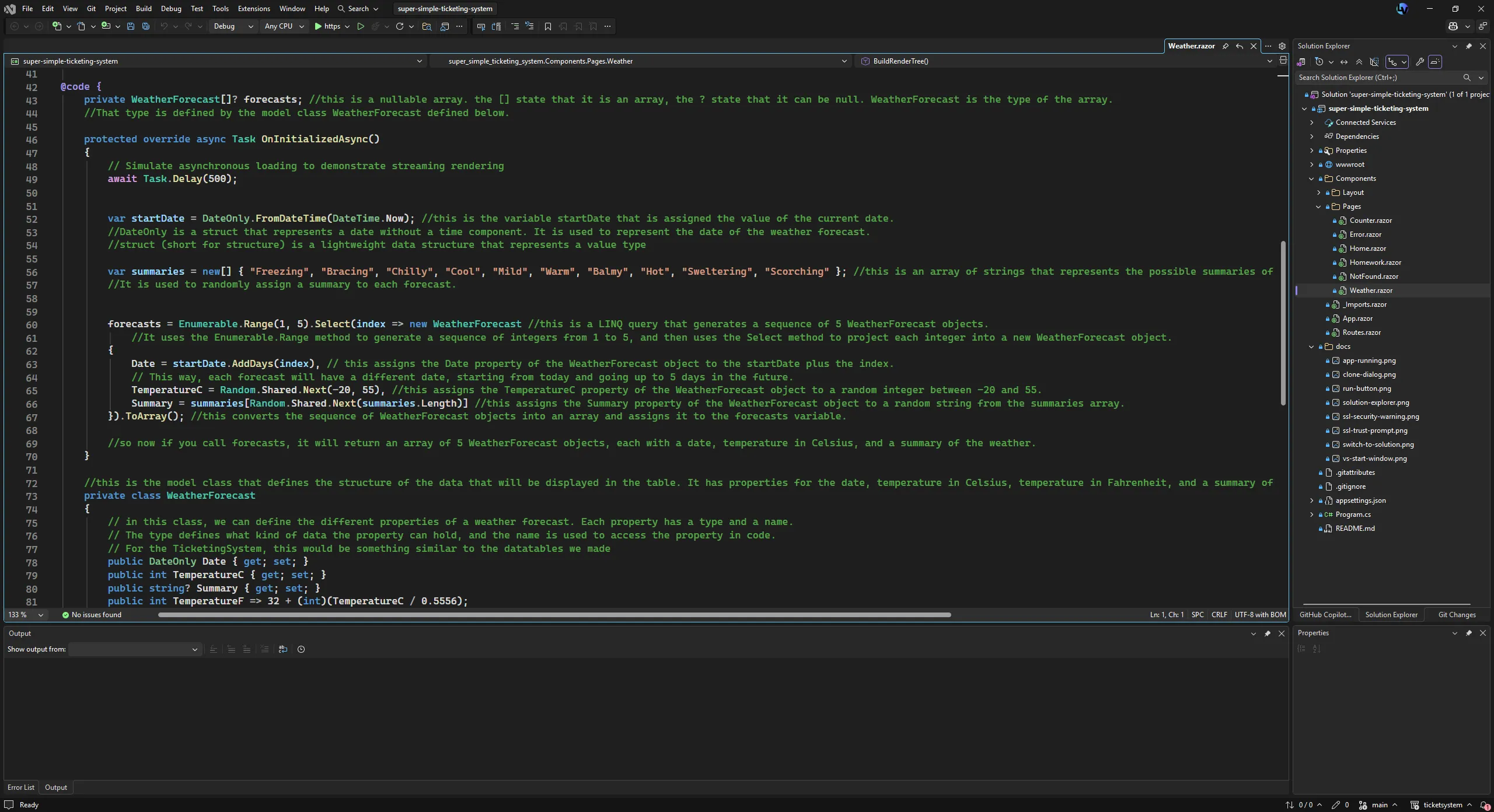
  • Kept the sample pages in on purpose — Counter and Weather are useful reference material for people who have never touched Razor
  • Bootstrap 5 ships with the template, so they can start styling immediately with no setup

Teaching material

  • Commented Weather.razor line by line — what the @code block is, what the model class does, how the foreach builds the table rows
  • Added a Homework.razor page with the actual assignment on it
  • Wrote a long comment at the top of Homework.razor explaining render modes, since the silent dead button is the #1 thing that will stall them
  • Put a checkbox progress tracker at the bottom of that page. It doubles as a live @bind and @if example they can crib for the assignment

The homework

  • Part 1: restyle the Home page with Bootstrap. Markup only, no C#
  • Part 2: new page with a textbox and a button that greets you by name. Greeting renders on the page, not in a popup — a JS alert would mean interop, which is too big a jump for lesson one
  • Stretch goals go up to the popup version, so there’s somewhere to go if anyone finishes early

README

  • Rewrote it around the Visual Studio GUI. No terminal at all — clone, run, branch, commit, push, all through the UI
  • Documented the certificate prompts and the folder-view-vs-solution thing, since both look like something is broken when it isn’t
  • Made branching and pushing an explicit requirement. Three commits minimum, on their own branch, pushed
  • Pulled the screenshots out of my old Google Doc into /docs as real files. GitHub strips base64 images out of markdown so the embedded ones would not have rendered

Decisions

  • No Entity Framework. Going with DTOs and Dapper instead so they write the SQL themselves
  • No database yet. They get the scaffold to break first. Connection strings and schema come later
  • API after the Blazor app, once the service layer exists — adding endpoints on top of it makes the point better as a refactor than as an upfront design
  • React dashboard after that, for practice against the API

Next

  • Get everyone cloned, running, and pushed to their own branch
  • Review the homework
  • Start on the ticket schema and wiring up Dapper
#NET 10#C##Bootstrap